
High level view of the mDIS Build pipeline, "Gitlab Runner" service
High level view of the mDIS Build pipeline, "Gitlab Runner" service
What's a runner?
A "runner" is a program that runs on a dedicated server, wb31.gfz.de, and executes the build pipeline. The runner reports result back to the Gitlab CI/CD system, git.gfz.de.
Background
The server git.gfz.de does not have access to the mDIS infrastructure (servers, networks) and cannot access certain resources (e.g. directories,passwords). Also, git.gfz.de cannot handle the load of the build pipeline.
So we use another dedicated server, wb31.gfz.de, to run the build pipeline. The runner software is in charge of running the pipeline, and to report back the results to git.gfz.de. See the diagram below.
Runner architecture
Runner architecture for icdp-osg mDIS instances. Communication between the Gitlab CI/CD system and the runner is shown.
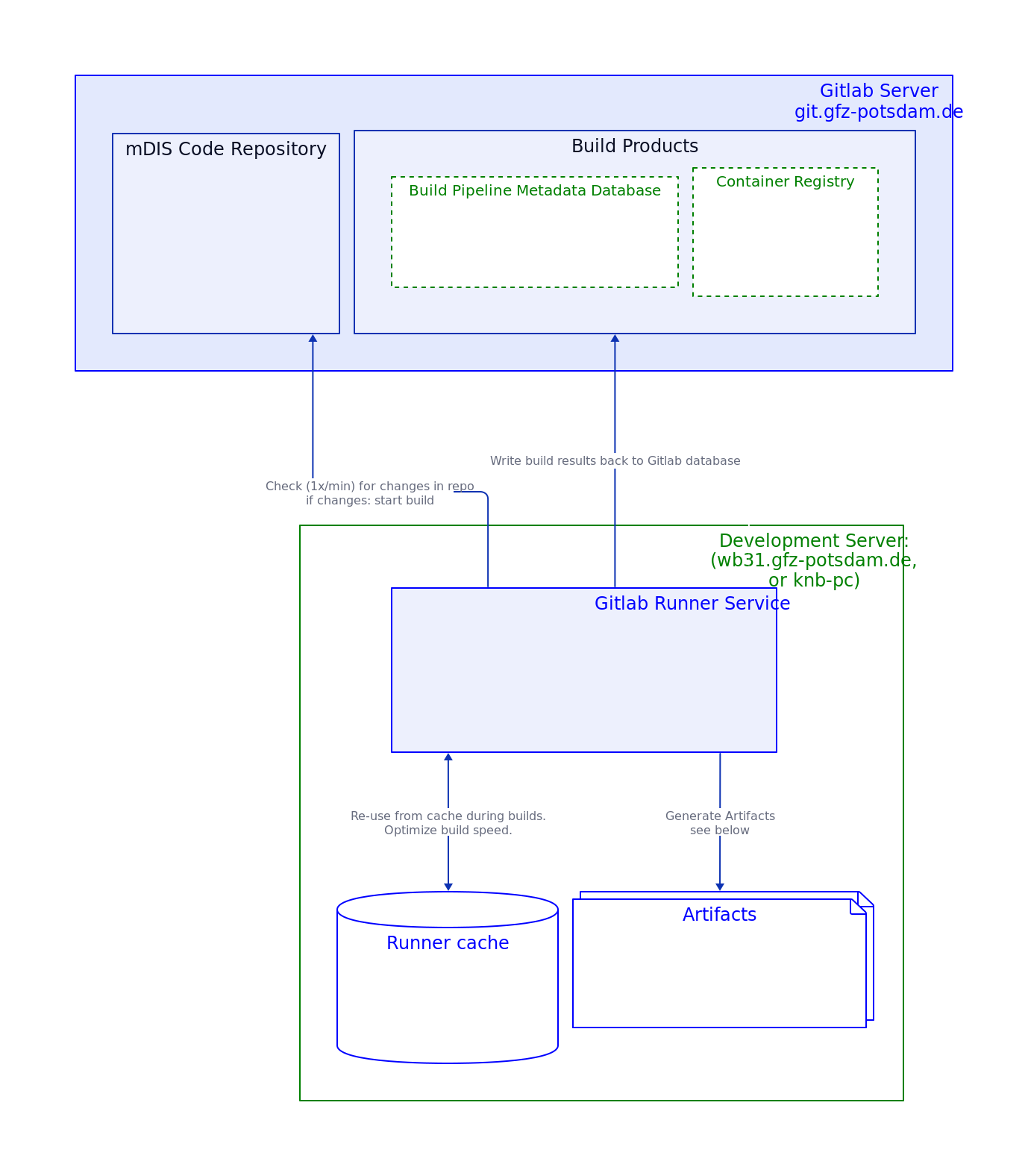
This image 'Runner architecture' as SVG File. That SVG file contains many more detailed notes.

The Runner is a program that runs nonstop on wb31.gfz.de and executes the build pipeline. The runner is actually a Linux service that is managed by systemd, and the gitlab-runner command line tool.
- There can be n runners running on the same server wb31.
- But there is only one service coordinating the n runners.
- For an examplary runner configuration see configfile-snippet below.
- The Runner is a Docker container, and it can start other Docker containers during build and test phases.
Second runner host
There are runners (v15.9) on a second host wb33 (knb-PC), in charge of building VirtualBox instances. The second runner is similarly configured as the first runner illustrated graphically above.
Runner configuration (ICDP internal)
Development Host wb31
Runner configuration snippet
This runner (v16) is one of several used by icdp-osg, and is configured in the file /etc/gitlab-runner/config.toml on wb31:
[[runners]]
  name = "wb31-mdis-docker"
  url = "https://git.gfz.de/"
  id = 1168
  token = "xyz123xxxxxxxxxxxxxxxxxxxxxx"
  token_obtained_at = 2023-03-06T18:09:02Z
  token_expires_at = 0001-01-01T00:00:00Z
  executor = "docker"
  [runners.docker]
    tls_verify = false
    image = "docker:24"
    privileged = true
    disable_entrypoint_overwrite = false
    oom_kill_disable = false
    disable_cache = false
    volumes = ["/cache", "/certs/client", "/var/www/dis/15-foundation:/builds/icdp-osg/mdis:rw"]
    pull_policy = ["if-not-present"]
    shm_size = 0
These settings will be optimized for actively refining the build-pipeline, in particular, adding new tests. This will work best if the test artifacts (textfiles with test results) are not deleted immediately after the test run, but are kept in a persistent Docker volume.
This is achieved by mounting the /builds/icdp-osg/mdis directory of the container to the host's /var/www/dis directory. This directory is also used by the webserver, so the test artifacts are also available via the webserver.
Development Host wb33 (icdp-osg knb office PC)
ShellExecutor, VirtualBox Builds. Runner configurations not shown here, coming soon.
Runner Tips and Tricks
The Build Pipeline is a complex system, and it is not always clear how everything works. Here are some tips and tricks to help you understand what is going on.
Our build pipeline makes heavy use of the Docker-in-Docker (DinD) feature of the Gitlab CI/CD System and the Gitlab Runner. This means that the Gitlab Runner can start Docker containers, and those can start other Docker containers and build images. This is a very powerful feature, but it can be confusing at first.
The volumes "/cache", "/certs/client", are needed for the Docker-in-Docker mechanism to connect in an encrypted way to GFZ's Docker registry.
Execute on wb31, or any host, in no particular order
Show runner status
Does the runner-service run?
sudo gitlab-runner status
Runtime platform           arch=amd64 os=linux pid=2408936 revision=85586bd1 version=16.0.2
gitlab-runner: Service is running
List runner configs
On wb31
The runner service governs which runner instances exactly?
sudo gitlab-runner list # ConfigFile=/etc/gitlab-runner/config.toml
wb31-gfz-gitlab-knb                                 Executor=docker Token=rVavKo URL=https://git.gfz.de/
wb31-mdis-vanilla-volume                            Executor=docker Token=BfzsRQ URL=https://git.gfz.de/
wb31-mdis-docs-project-runner                       Executor=docker Token=WXHSgV URL=https://git.gfz.de/
wb31-mdis-docker                                    Executor=docker Token=4C6AVj URL=https://git.gfz.de/
* wb31-projrunner-shellexec                           Executor=shell  Token=AsX-3T URL=https://git.gfz.de/
* wb31-helmholtz-cloud--icdp-osg-grouprunner          Executor=docker Token=yW9pbj URL=https://codebase.helmholtz.cloud/
* wb31-mdis-blank-volume                            Executor=docker Token=glrt-G URL=https://git.gfz.de
* - paused or unregistered runners. Status is NOT shown by sudo gitlab-runner list. Read on to see how to get runner status.
Runtime platform: arch=amd64 os=linux version=16.0.2
List runner statuses
Can be active, paused, or unregistered.
Get runner-ids on wb31, then get runner statuses
    # runner id,runner name, runner status
    [1162,"wb31-gfz-gitlab-knb","online"]
    [1164,"wb31-mdis-vanilla-volume","online"]
    [1165,"wb31-mdis-docs-project-runner","online"]
    [1168,"wb31-mdis-docker","online"]
    [1171,"wb31-projrunner-shellexec","paused"]
    [1231,"wb31-mdis-blank-volume","paused"]
Actually we had to fetch runner statuses from git.gfz-potsdam (not wb31) with this little shell script accessing the Gitlab REST API.
Note for the token to be used: It must have the manage-runners scope. The classic read-api scope is not sufficient. Generate a new token with the correct scope, if needed.
#!/usr/bin/env bash
# - Q: how to get runner status on this host (wb31)?
# - A: We must query gitlab REST API on _different_ host, git.gfz.de.

# Get a personal access token in your "User Settings" section of Gitlab GUI.
# Grants yourself sufficient access to the API,
# including ALL groups and projects, the container registry, and the package registry.
# Enter your gitlab access token here:
# GITLAB_TOKEN=secret_fbMryb...
GITLAB_TOKEN=$(jq -r '.auths["git.gfz-potsdam.de:5000"].auth' ~/.docker/config.json | base64 -d)
GITLAB_USER=knb
ids=$(sudo grep -A 1  git.gfz  /etc/gitlab-runner/config.toml | grep "id = " | grep -oP "\d+")

for id in $ids; do
  curl -sL --header "PRIVATE-TOKEN: $GITLAB_TOKEN" "https://$GITLAB_USER@git.gfz.de/api/v4/runners/$id" \
    | jq -c '[.id, .description, .status, (.projects[] | (.path_with_namespace + "; " + (.tag_list | join("--"))))]';
done

# runner id,runner name, runner status
[1162,"wb31-gfz-gitlab-knb","online"]
...
Note: Runner status is easier to determine with the Gitlab Webinterface.
In Gitlab GUI, use Sidebar Menu "Settings/CI/CD/Runners".
Dive deeper into runners
Runner past activities
Use the docker log <runner-container-id> command to see what the runner was doing.
Runner relicts as persistent volumes
You might need to clean up volumes manually from time to time, e.g. if you run out of disk space, or when you know that some of the volumes are not needed anymore (runners were removed).
For Runners using the Docker-Executor:
- List Runner volumes with
docker volume ls | grep runner. - Runner Volume ids will show up as
runner-<runner-shorttoken>-project-<project-id>.... - Run
docker volume inspect <volumename, then check volume directories- filesystem locations:
docker volume inspect <volume-id> | grep Mountpoint - (This value of the
Mountpointkey is the filesystem location of the volume on the host.)
- filesystem locations:
Runner caches
Sometimes the runners can fail, might have problems to access the internat, or behave strangely. This can happen after configuration changes (config.toml file), or for no apparent reason. The runner will start late, or does not start at all.
Then it might help to clear the runner cache:
Manually via Web Interface:
- Open your mDIS repository in your web browser.
- In the sidebar, click on Build > Pipelines.
- In the main panel (top right corner), click the
Clear Runner Caches button.
File: guide/devops/cicd/build-system-high-level.md
- via API: Not available in GitLab. GitLab does not provide a REST API endpoint to “clear runner caches” (the UI button is not exposed as a public API operation).
- Workarounds:
- Change the cache key in
.gitlab-ci.ymlto force a new cache namespace (effectively “clears” cache usage for subsequent pipelines). - Delete cache storage on the runner host (only if your setup uses a local cache path / Docker volumes).
- Change the cache key in
- Workarounds:
More about Cache vs Artifacts, offical gitlab docs.