Created 2023, for developers. --- Regular Users: read the mDIS User Documentation
About the mDIS Build and Installation System
It is a long way from source code to running mDIS website. But how do we create mDIS websites at GFZ, and how to maintain codebases of the various mDIS instances?
With a build system that is located right here, where the mDIS source code is.
Goals and characteristics of the mDIS Build System:
- Automate mDIS builds and tests.
- Shorten feedback loops for code improvements.
- Read more: Build Pipeline Flowchart.
The Build System is based on Gitlab CI/CD, Docker, and other DevOps tools.
Thus, the mDIS Source Code, the mDIS Build and Customization machinery, and backups of mDIS instances, are all in the same place: GFZ's Gitlab. All code at same place, same toolset, right here in this repo.
See sidebar of mDIS Repo, "CI/CD / Pipelines" entry (as not-logged-in User), ""Build/Pipelines entry as logged-in user.
Visual Overview Diagrams
mDIS Build Pipeline: Technical Overview Diagrams
Click on any image to enlarge. The read diagrams from top to bottom.
| Runner Deployment Scheme | General Pipeline |
|---|---|
 |  |
| What's a Runner, you ask? Read this. | 2 Major pipeline phases: ~green:as mDIS was in 2019, plain PHP7 brown: PHP8 + newer software, customized mDIS |
mDIS Build Workflows: Flowchart Diagrams (BPMN Standard)
Click on any image to enlarge. Then read diagrams from top left to bottom right.
| Simple Processing of Merge Requests | Complex multi-stage Deployment |
|---|---|
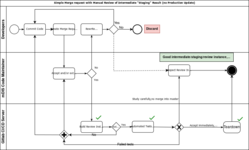 | 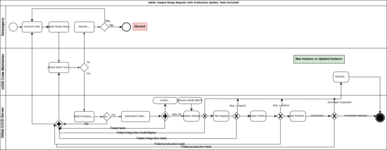 |
| git master branch. No automatic inclusion into "release" builds, no deployment to production servers. (3 Steps) | git feature branches. Immediate or on-demand pre-deployment of the main mDIS codebase, on production servers (almost); including tests. (5 steps) |
mDIS General Deployment scheme:
Deployment -releasing new mDIS instance to users- comes last. This step is not yet part of the build process, but it is closely related to it. It is not yet automated; these steps are still carried out manually (e.g, add another mDIS instance to the public internet).
In order to take mDIS instances into production, we need to deploy them to a server. That is equivalent to adding a new box in the middle row of this diagram:
| Adding mDIS Production instances |
|---|
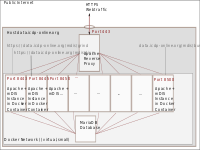 |
| mDIS on the public internet. Reverse Proxy Setup |
In Production, mDIS instances run behind an Apache Reverse Proxy Webserver; science data is stored in individual mySQL databases (on a shared mySQL server); and the mDIS codebase is deployed as Docker containers.
However there are 3 modes of mDIS installation: online (public internet), cloud based, and offline (standalone). "Cloud-based mode" and "Offline mode" are not described here. Read the official user documentation for that.
What this Wiki is not:
- a comprehensive "Knowledge Base" for mDIS users. See official mDIS documentation for that.
- a fixed set of documents. It is a work in progress, and will change over time.
More - Scratchpad, How to contribute to this wiki...
ToDo items - unresolved CI/CD issues, and other notes.